Products | Atangeo Balancer and Balancer nPro






The best polygon reduction technology is now available as an efficient, easy to use and highly affordable tool.
ROBUST and ACCURATE
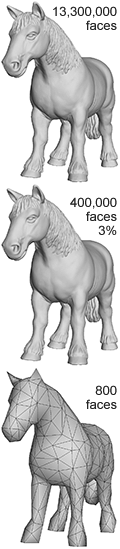
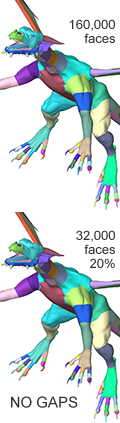
Atangeo Balancer features high quality, high fidelity mesh simplification (aka polygon reduction or mesh decimation). It accurately preserves the model visual appearance, features, normals, texture coordinates, materials and layer boundaries.
PERFECT BALANCE
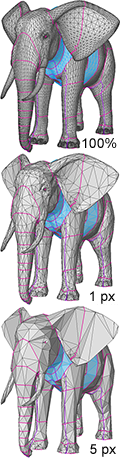
Quickly and easily find your perfect balance between visual appearance and the number of polygons. Instantly pick an optimized model with required face count or use accurate tolerance-based simplification to obtain desired visual quality just in one click.
ULTRA FAST and EFFICIENT
Balancer is extremely fast and efficient. Very small memory footprint and high speed performance allow Balancer to quickly and easily simplify models with millions of faces.
Balancer nPro is designed to optimize 3D models for

- 3D printing
- CAD / CAM
- architecture
- any other use that requires metric specified accuracy
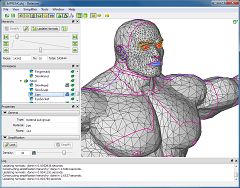
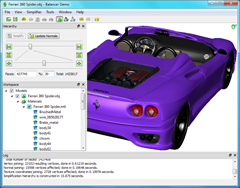
Screenshots
Edition Comparison
| Features |
 Balancer |
 Balancer nPro |
| High quality, high performance mesh simplification |
 |
|
| Construction of the entire LOD hierarchy in one shot |
|
|
| Densities control for selective reduction rate of different groups/sub-meshes |
|
|
Preservation and simplification of
|
|
|
| Accurate pixel-based tolerance simplification |
|
|
| Accurate metric-based tolerance simplification |
 |
|
| Units conversion and assignment |
|
|
| Watertightness verification |
|
|
|
Supported image formats: JPEG, PNG, TIFF, BMP, PPM, PBM |
|
|
| Supported 3D formats | ||
| Wavefront .OBJ |
|
|
| Polygon File Format .PLY |
|
|
| Stereolithography .STL |
|
|
| Supported operating systems | ||
|
Windows 10, 11 and above, 64 bit, 32 bit will be deprecated soon |
|
|
|
Mac OS X 10.9 and above, fully functional on M1 |
|
|
Free Versions
In addition to the main version, Balancer has these two variations.
- Balancer Demo
is an evaluation version. It is fully functional except for saving. - Balancer Lite
is a free version. It is fully functional but works with small meshes only.
The limit for a single mesh is 65,000 vertices.Balancer Lite can be used for non-commercial purposes in non-business, non-commercial environment only.
Commercially, 30 days evaluation period applies.